
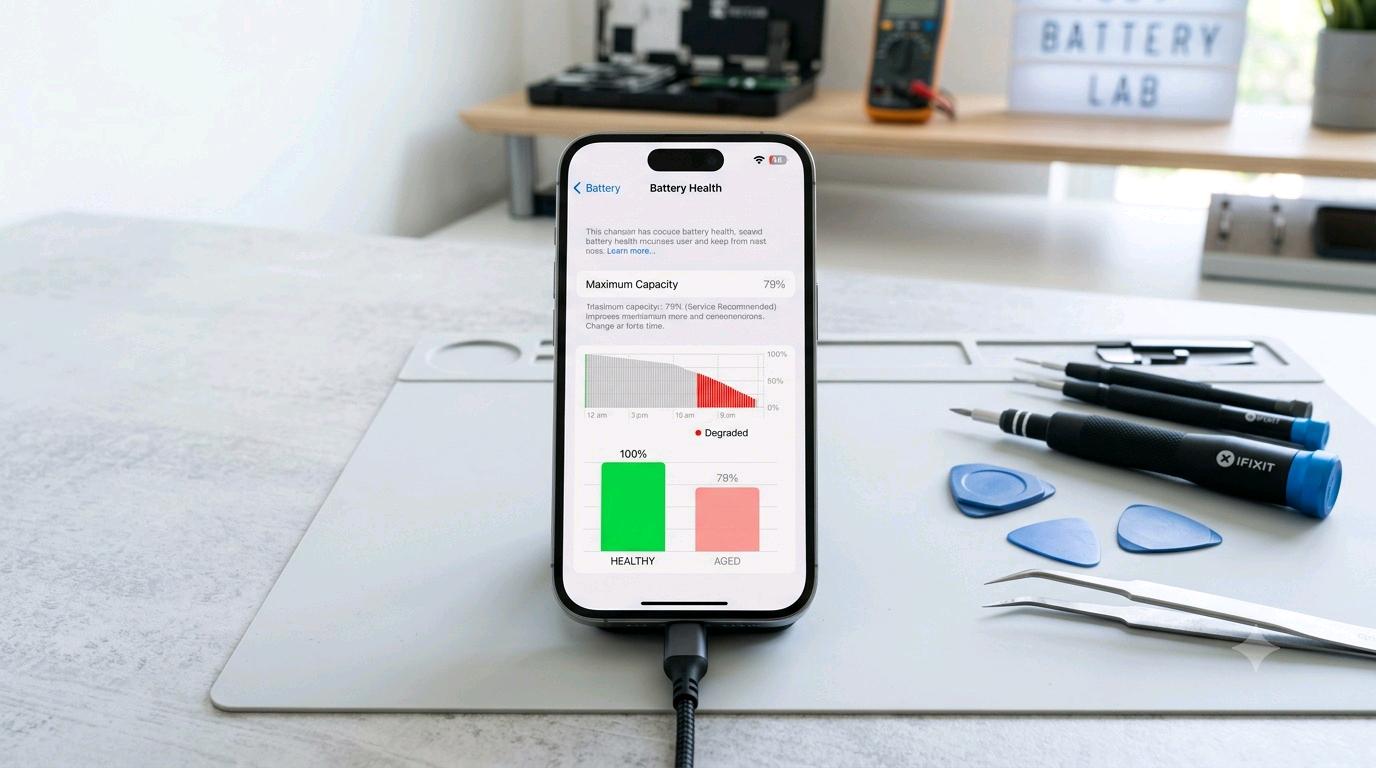
Why does your phone battery drain so fast? The most common reasons are high screen brightness, power-hungry apps, poor network signal, background activity, GPS, Bluetooth, high refresh rates, gaming, heat and an aging battery. You can improve mobile battery life by reducing unnecessary background activity, controlling display settings, keeping the phone cool and checking which apps consume the most power. If the battery has significantly degraded, however, changing settings may not be enough and a battery replacement may be necessary.
Why Does Mobile Battery Drain So Quickly? How to Increase Battery Life and Check a Bad Battery
A smartphone battery naturally loses capacity as it goes through charging and discharging cycles. However, a battery that seems to disappear unusually quickly can also be affected by apps, network conditions, display settings, temperature and charging habits.
This guide explains why phone battery drains quickly, how to make your battery last longer during the day, how to check whether the battery is actually damaged, and what to do when the battery needs replacement. It also explains the tools required if you are considering a DIY phone battery replacement.
Main Topics
1. Screen Brightness Is One of the Biggest Battery Drainers
The smartphone display can consume a substantial amount of power, particularly when brightness is high. A large, bright display running continuously can reduce battery life much faster than normal use.
If you regularly keep brightness near maximum, try using automatic or adaptive brightness. You can also reduce the screen timeout so that the display turns off when you are not using the phone.
- Reduce unnecessary screen brightness.
- Use adaptive brightness when available.
- Reduce screen timeout.
- Turn off always-on display features if you do not need them.
- Consider a lower refresh rate when maximum smoothness is unnecessary.
2. Background Apps Can Secretly Consume Battery
Some applications continue working even when you are not actively using them. Social media, cloud synchronization, navigation, video, shopping and communication apps can perform background tasks.
Open your phone's Battery or Battery Usage section and check which applications are consuming the most power. If an app uses an unusually large amount of battery compared with your usage, investigate its background activity.
Do not blindly restrict every application. Some apps need background access for notifications, synchronization or other important functions.
3. Poor Network Signal Can Cause Fast Battery Drain
Weak cellular reception can be an overlooked cause of fast battery drain. When the phone struggles to maintain a connection, its modem may work harder to communicate with the network.
You may notice faster battery consumption in basements, remote locations, elevators, large buildings or areas with weak reception.
Tip: If you are in an area with extremely poor or unavailable cellular service and do not need connectivity temporarily, Airplane Mode can reduce unnecessary radio activity.
4. GPS, Bluetooth, Wi-Fi and Mobile Data
Wireless features do not automatically mean massive battery drain, but continuous use can contribute to power consumption. Location services can be particularly demanding when apps repeatedly request your location.
- Disable location access for apps that do not need it.
- Review Bluetooth connections you no longer use.
- Turn off mobile hotspot when finished.
- Disable Wi-Fi scanning or other unnecessary scanning features when appropriate.
- Check which apps frequently request location access.
5. High Refresh Rate Can Affect Battery Life
Many modern phones offer displays running at 90Hz, 120Hz or higher. Higher refresh rates make scrolling and animations feel smoother, but they can also increase power consumption.
If your priority is longer smartphone battery life rather than maximum smoothness, consider using an adaptive or standard refresh-rate mode.
6. Gaming, Video Recording and Heavy Apps
Gaming and other intensive workloads can consume significant power because they place high demands on the processor, graphics hardware, display and network connection.
Long gaming sessions can also increase device temperature. Heat is especially important because excessive temperature can accelerate battery aging.
Similarly, recording high-resolution video, using navigation for long periods, editing videos and running demanding applications can cause faster battery depletion.
7. Heat Can Reduce Battery Health
Heat is one of the biggest enemies of smartphone batteries. Repeated exposure to high temperatures can accelerate chemical aging inside a rechargeable lithium-ion or lithium-polymer battery.
Avoid leaving your phone in direct sunlight, inside a hot vehicle or under a pillow while performing demanding tasks.
Important: If your phone becomes unusually hot, develops a swollen back panel, lifts the screen, produces a strange smell or shows other signs of physical battery damage, stop using it and seek professional service. Do not puncture, crush or attempt to open a swollen battery.
8. How to Make Your Phone Battery Last Longer
You do not need to use every battery-saving trick available. Start with the settings that have the biggest practical impact.
- Lower display brightness when maximum brightness is unnecessary.
- Use battery saver when you need extra runtime.
- Reduce unnecessary background activity.
- Limit unnecessary location permissions.
- Use adaptive refresh rate if available.
- Keep the phone cool.
- Install system and app updates when they contain important power or performance improvements.
- Remove apps you no longer use.
- Check battery usage regularly to identify unusual consumption.
- Use a reliable charger and cable.
9. Does Closing All Apps Improve Battery Life?
Not necessarily. Modern smartphone operating systems are designed to manage applications and memory automatically. Constantly opening the recent-apps screen and force-closing everything can sometimes be unnecessary.
Instead of closing every app, focus on applications that are genuinely consuming excessive battery in the background.
10. How to Check If Your Phone Battery Is Bad
A battery that drains quickly is not automatically a damaged battery. First determine whether an app, display setting, network problem or software issue is responsible.
Look for these warning signs:
- The phone loses battery unusually quickly even with light use.
- The battery percentage suddenly drops by a large amount.
- The phone shuts down even though the displayed percentage is not very low.
- The device restarts unexpectedly under moderate or heavy load.
- Battery life has become dramatically shorter compared with when the phone was new.
- The phone becomes unusually hot during ordinary use.
- The battery health or capacity diagnostic shows significant degradation, where the operating system provides such information.
- The phone or display appears physically swollen or lifted.
11. Check Battery Health From Phone Settings
Many smartphones provide battery information directly through their settings. The exact menu differs between manufacturers and operating systems.
Look under sections such as:
- Settings → Battery
- Settings → Battery Health
- Settings → Battery and Device Care
- Settings → Power & Battery
Depending on the device, you may see battery capacity, battery usage, charging information, diagnostics or an estimated health condition.
Do not assume that one percentage alone proves that a battery must be replaced. Battery diagnostics are estimates, and real-world symptoms matter too.
12. Use Battery Usage Statistics to Find the Real Problem
Before replacing the battery, check the Battery Usage screen. It can tell you whether the display, a particular app, mobile network or another system component is responsible for unusual consumption.
| What You Notice | Possible Cause | What to Try |
|---|---|---|
| Battery drains mainly while screen is on | High brightness, gaming or heavy apps | Reduce brightness and demanding activity |
| Battery drops quickly while idle | Background apps, network or software issue | Check battery usage and background activity |
| Phone gets hot frequently | Heavy workload, poor signal or battery problem | Find the source of heat and stop abnormal use |
| Sudden percentage drops | Battery aging or inaccurate battery estimation | Run diagnostics and consider professional testing |
| Phone shuts down unexpectedly | Battery degradation or hardware issue | Have the battery and device inspected |
13. When Should You Replace a Phone Battery?
Battery replacement makes sense when the battery has significantly degraded and is affecting normal use. If the phone is otherwise in good condition, replacing the battery can be much cheaper than replacing the entire device.
A replacement may be worth considering when:
- Battery runtime has become consistently poor.
- The phone shuts down unexpectedly.
- Battery diagnostics indicate significant degradation.
- The device becomes unreliable during normal use.
- The battery is physically damaged or swollen and requires immediate professional attention.
However, if the phone is very old and also has a damaged display, poor performance, outdated software support or other expensive hardware problems, compare the total repair cost with the cost of another device.
14. Where Should You Replace a Bad Phone Battery?
For most people, the safest option is an authorized service center or a reputable professional repair shop experienced with the specific phone model.
A professional technician generally has the correct tools to open the device, disconnect the battery safely, replace adhesives or seals where necessary and test the phone afterward.
Choose Professional Replacement If:
- The phone has a sealed design.
- The battery is glued firmly inside the device.
- You have never opened a smartphone before.
- The battery is swollen or physically damaged.
- The phone has water-resistance seals that need to be restored.
- You do not have the correct tools.
15. Can You Replace a Phone Battery Yourself?
Yes, some batteries can be replaced by experienced DIY repairers, but modern smartphones are often difficult to open. Batteries may be strongly adhered to the internal frame, and delicate cables, screens and other components can be damaged during disassembly.
Before attempting a DIY repair, find a repair guide specifically for your exact phone model. The internal design of two phones that look similar can be completely different.
16. Tools Needed for DIY Battery Replacement
If you decide to perform a battery replacement yourself, the required tools depend on the phone model. A typical repair toolkit may include:
- Precision screwdriver set with the correct bits.
- Plastic opening picks for separating the housing.
- Suction handle for lifting certain screens or back covers.
- Plastic spudger for disconnecting components safely.
- Tweezers for handling small parts and adhesive tabs.
- Replacement battery specifically designed for the exact phone model.
- Replacement adhesive appropriate for the device.
- Isopropyl alcohol may be used in some repair procedures, but only according to a model-specific repair guide.
- ESD protection such as an anti-static mat or wrist strap can reduce electrostatic risks.
- Good lighting and a clean workspace.
17. What You Should Never Do During Battery Replacement
- Never puncture a lithium battery.
- Never bend or crush the battery.
- Never use excessive force to remove a strongly glued battery.
- Never use a metal tool directly against the battery cell.
- Never install a visibly swollen or damaged replacement battery.
- Never ignore smoke, unusual smell, heat or swelling.
- Never work near flames or other ignition sources.
A damaged lithium battery can create a serious fire hazard. If the battery is swollen or physically compromised, DIY replacement is not recommended. Take the phone to a qualified repair professional.
18. How to Choose a Replacement Battery
Do not select a battery merely because it has the same physical size. Verify the exact phone model and battery part number whenever possible.
Look for a replacement from a reputable manufacturer or reliable repair-parts supplier. Extremely cheap batteries with questionable specifications can create reliability and safety problems.
Also check whether replacing the battery affects warranty, water resistance or other manufacturer service conditions.
19. Charging Habits That Can Help Battery Longevity
Modern lithium batteries do not need to be completely discharged before charging. Frequent deep discharges are generally unnecessary.
For everyday use, follow the charging guidance provided by your phone manufacturer. Avoid excessive heat during charging and use compatible, reliable charging accessories.
Features such as optimized charging, adaptive charging or charging limits can be useful when supported by the device.
20. Battery Replacement vs Buying a New Phone
| Situation | Better Option |
|---|---|
| Phone works well but battery life is poor | Battery replacement may be sensible |
| Battery is swollen | Stop using it and seek professional service |
| Phone has several expensive hardware problems | Compare repair cost with replacement cost |
| Phone is otherwise fast and reliable | Replacing the battery can extend its useful life |
| Replacement battery is difficult to access | Professional repair is usually safer |
21. A Simple Battery Troubleshooting Checklist
If your phone suddenly starts losing battery quickly, do not immediately assume that the battery is dead. Work through this checklist:
- Restart the phone.
- Open the battery usage screen.
- Identify unusually power-hungry apps.
- Check screen brightness and refresh rate.
- Review location permissions.
- Check whether the phone is frequently searching for a network.
- Install available system and application updates.
- Check whether the phone is overheating.
- Test battery performance after normal use.
- If problems continue, run the manufacturer's battery diagnostics or visit a repair professional.
Frequently Asked Questions
Why is my phone battery draining so fast?
Common causes include high screen brightness, background apps, poor network signal, GPS, high refresh rates, gaming, video recording, heat and an aging battery. Check Battery Usage first to identify the biggest consumer.
How can I increase my phone battery life?
Reduce unnecessary brightness, control background apps, limit unnecessary location access, use adaptive refresh rate, keep the phone cool and enable battery-saving features when needed.
How do I know if my phone battery is bad?
Look for unusually short runtime, sudden percentage drops, unexpected shutdowns, excessive heat or battery-health diagnostics showing significant degradation. A professional inspection can provide a more reliable diagnosis.
Is fast battery drain always a sign of a bad battery?
No. Software, background applications, weak network reception, display settings and heavy workloads can all cause fast battery drain without the battery being physically defective.
Can I replace my phone battery myself?
Some phones can be repaired at home, but modern smartphones can be difficult and risky to open. If the battery is glued in place or swollen, professional replacement is strongly recommended.
What tools are needed to replace a smartphone battery?
A model-specific precision screwdriver set, plastic opening picks, spudger, tweezers, suction handle, suitable replacement adhesive and the correct replacement battery are commonly required. Some repairs may require additional tools.
Should I replace a swollen phone battery myself?
No. A swollen lithium battery can be hazardous. Stop using the device if it is unsafe to do so and seek qualified professional service.
Does a new battery make an old phone faster?
A new battery does not automatically increase processor performance. However, replacing a severely degraded battery can improve reliability and may eliminate unexpected shutdowns or power-related performance problems.
Is it better to replace the battery or buy a new phone?
If the phone is otherwise reliable and the main problem is battery degradation, replacement may be the more economical choice. If several major components are failing or repair costs are high, compare both options.
Conclusion
Fast battery drain does not always mean that your smartphone battery is damaged. Start by checking battery usage, display settings, background applications, network reception, location services and device temperature. These are often responsible for a large portion of unnecessary power consumption.
If the battery has genuinely degraded, shows unusual behavior or causes unexpected shutdowns, a replacement can restore much of the phone's normal runtime. For most users, an authorized service center or experienced repair technician is the safest choice.
DIY battery replacement is possible on some smartphones, but it requires the correct tools, a model-specific repair procedure and careful handling of the battery. Because lithium batteries can be hazardous when punctured, bent or overheated, do not attempt a repair if the battery is swollen or damaged.
With sensible charging habits, good temperature management and regular battery monitoring, you can often extend smartphone battery life and keep your device useful for longer.
Disclaimer: This article provides general information about smartphone battery maintenance, troubleshooting and replacement. Battery designs, repair procedures and diagnostic features vary by manufacturer and model. Always follow the official repair instructions for your specific device. If a battery is swollen, leaking, smoking, unusually hot or physically damaged, do not attempt DIY repair and seek qualified professional assistance.